
Laptop News • ThinkPad • Mobile Workstation
Lenovo ThinkPad T16g Gen 3
Lenovo’s ThinkPad T16g Gen 3 quietly lands as a rare hybrid: a corporate-friendly 16-inch ThinkPad that can be configured like a desktop replacement—HX-class Intel Core Ultra, GeForce RTX 5080/5090, four SO-DIMM slots, and up to three M.2 SSDs—while still keeping ThinkPad security, ports, and serviceability.
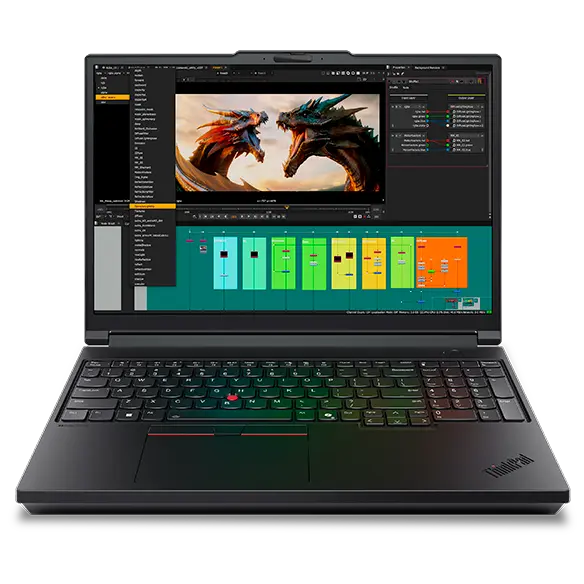
What Lenovo is doing with the ThinkPad T16g Gen 3
Lenovo has a long history of building two very different kinds of 16-inch laptops: enterprise ThinkPads that prioritize security, ports, maintainability, and fleet compatibility, and performance laptops that prioritize GPU horsepower, high power limits, and peak benchmark numbers. The ThinkPad T16g Gen 3 is notable because it tries to bridge those categories in a single model.
On paper, the ThinkPad T16g Gen 3 reads like a mobile workstation: it can be configured with HX-class Intel Core Ultra processors, high-end NVIDIA GeForce RTX laptop graphics, workstation-style upgradeability (four SO-DIMM slots), and multi-drive storage. At the same time, it keeps ThinkPad DNA—business-ready security features, conservative design, and practical I/O. Lenovo’s own spec reference describes it as aimed at AI developers and data scientists who need desktop-class performance on the move.
That combination is rare in 2026’s laptop market. Many “power” machines either look and behave like gaming laptops (with gamer aesthetics, fewer enterprise ports, and less serviceability), or they look like premium ultrabooks (thin, light, and locked down with soldered memory). The ThinkPad T16g Gen 3 sits in a third lane: a professional chassis with unusually aggressive configuration options.
Why it matters: enterprise chassis, consumer GeForce power
The “g” in T16g matters. In Lenovo’s ecosystem, it signals a tilt toward graphics. The T16g Gen 3 can be configured with NVIDIA GeForce RTX 5080 or RTX 5090 laptop GPUs, which is not a typical T-series move. In practical terms, GeForce-class GPUs can be compelling for creators, AI experimentation, CUDA tooling, and GPU-accelerated pipelines— especially when paired with a high-core-count HX CPU.
But this is not simply “a gaming laptop in a suit.” The bigger story is platform pragmatism: RJ-45 Ethernet, multiple Thunderbolt ports, enterprise security, and real serviceability. These are the things that keep IT departments happy and keep downtime low over a multi-year lifecycle.
The result is a machine that could appeal to: developers who dock into multi-monitor workstations, creators who need GPU acceleration but prefer a professional design, and teams that want performance without sacrificing manageability. It is also a signal: Lenovo is willing to blur its traditional lines between “T-series business laptop” and “workstation-grade power user device.”
However, the most important nuance—especially for readers who care about sustained performance—is that configuration alone does not guarantee workstation-class results. Power limits, cooling implementation, and adapter constraints can meaningfully shape real-world outcomes. We’ll address that directly in the Performance Reality Check section below.
Quick spec highlights (verified)
This section is intentionally “news brief” style: the key facts that define the ThinkPad T16g Gen 3. These highlights are taken from Lenovo’s published spec reference and product documentation (linked in Sources).
- CPU platform: Intel Core Ultra Series 2 HX (up to Core Ultra 9-class HX configurations listed in PSREF model pages).
- GPU options: NVIDIA GeForce RTX 5080 (16GB GDDR7) or RTX 5090 (24GB GDDR7) depending on configuration.
- Memory: Four DDR5 SO-DIMM slots; high maximum capacities listed (configuration-dependent, including ECC on supported setups).
- Storage: Up to three M.2 2280 SSD slots; one PCIe 5.0 x4 plus additional PCIe 4.0 x4 slots; high total capacity support listed.
- Display options: WUXGA IPS (500 nits), WQUXGA IPS (800 nits), or 3.2K tandem OLED touchscreen with VRR up to 120Hz.
- Ports: 2.5GbE RJ-45, HDMI 2.1, multiple USB-A, SD Express, and Thunderbolt (including Thunderbolt 5 ports listed).
- Battery & charging: 99.9Wh battery with 180W USB-C GaN adapter (USB PD 3.1 listed).
- Security: discrete TPM, optional smart card, fingerprint reader in power button, camera shutter (config-dependent).
- Form factor: 16-inch 16:10 device; weight starts around 2.5kg-class depending on configuration.
Display choices: IPS brightness vs tandem OLED
For a device positioned as a mobile desktop replacement, the display is not a side detail—it’s central. Lenovo offers multiple 16:10 panels, and they map to different priorities: battery efficiency, text clarity, HDR/contrast, and color work.
Option 1: 16" WUXGA IPS (1920×1200) at 500 nits
This is the pragmatic productivity panel. It’s bright enough for harsh office lighting and consistent for long sessions. For developers, administrators, and analysts, WUXGA is often the best “always-on” choice: easy on battery, easy on scaling, and perfectly usable for multi-window workflows. If your day is 70% browser + documents + spreadsheets + IDE + meetings, this panel tends to make the most sense.
Option 2: 16" WQUXGA IPS (3840×2400) at 800 nits
The high-resolution IPS option targets people who live in dense information: large spreadsheets, dashboards, heavy codebases, or multi-panel creative layouts. 800 nits is serious brightness—useful for bright rooms and for maintaining legibility at higher pixel density. It’s a “precision” panel: crisp text and wide workspace.
Option 3: 16" 3.2K Tandem OLED touchscreen (3200×2000), VRR 40–120Hz
This is the headline panel. Tandem OLED can deliver excellent contrast and HDR capability, and VRR up to 120Hz helps motion smoothness and UI responsiveness. It’s the display that makes the T16g feel “premium” instantly—especially for creators or anyone who values color richness. The tradeoff: OLED behavior and battery impact, which varies heavily by brightness, content, and workload.
Ports & connectivity: Thunderbolt 5 + 2.5GbE
If you’ve used modern thin laptops, you already know the pain: dongles for HDMI, dongles for Ethernet, dongles for SD cards. The ThinkPad T16g Gen 3 is built around a different assumption: you should be able to dock, present, transfer media, and connect to enterprise networks without a bag of adapters.
The standout pieces are: Thunderbolt 5 ports (as listed in Lenovo’s spec reference), full-size HDMI 2.1, and 2.5GbE RJ-45. Add in USB-A for legacy peripherals and SD Express for media workflows, and it’s a port selection that feels intentionally “work-first.”
For power users, this matters because the value of a high-end GPU laptop is tightly tied to how quickly it integrates into a workstation setup. Multi-monitor docks, fast external storage, and wired networking are where “desktop replacement” becomes real. Thunderbolt 5 in particular is a forward-looking move—especially for users who keep systems for years and upgrade docks and storage over time.
Upgrades & serviceability: SO-DIMM + multi-SSD is the sleeper headline
Many premium laptops now treat memory and storage as a one-time decision: soldered RAM, limited SSD options, and increasingly restricted service access. The ThinkPad T16g Gen 3 is an outlier. Lenovo lists a configuration approach that looks more like a traditional workstation than a sealed ultrabook: four DDR5 SO-DIMM slots and up to three M.2 2280 SSD slots.
For buyers who keep laptops beyond a typical two-year corporate refresh, this is not a minor detail—it’s a cost strategy. It means you can buy a reasonable baseline configuration now and expand later: move from 32GB to 64GB/96GB+ as your projects grow, or add dedicated storage for datasets, scratch disks, VMs, or media caches without replacing the entire system.
Multi-SSD support also enables more robust data hygiene. You can isolate OS/applications from active projects, or separate work and personal environments. And for some professional users, RAID capability (as listed in Lenovo’s spec reference) can matter for redundancy or specific performance patterns— though a strong backup strategy remains essential either way.
Performance reality check: power limits, cooling, and why “RTX 5090 inside” isn’t the full story
Here’s the part many product listings won’t emphasize: a laptop’s real performance is not defined solely by the CPU/GPU names. Sustained power limits, thermal design, and adapter capacity can meaningfully reshape results—especially in thin(er) desktop-replacement designs. In other words, the difference between “RTX 5080” and “RTX 5080 at a conservative TGP” can be large in workloads that run longer than a burst.
A recent technical review of the ThinkPad T16g Gen 3 noted exactly this kind of constraint: the GPU configuration tested was described as a slower RTX 5080 implementation (limited TGP), and the overall platform behavior was influenced by the switch to a 180W USB-C power adapter. The same coverage also flagged fan noise and cooling limitations under sustained combined loads. These points don’t negate the T16g’s concept—but they do clarify the tradeoffs: Lenovo may be prioritizing portability and USB-C charging standardization at the expense of maximum sustained GPU headroom.
For news readers, the key takeaway is not “good” or “bad.” The key takeaway is: this is a configuration- and workload-sensitive machine. If you mostly run bursty tasks (compiles, short exports, short renders, intermittent AI inference), you may see strong peak behavior. If you run long, steady GPU or mixed CPU+GPU loads (long renders, long training runs, heavy simulation), the platform’s limits will matter more.
So who should care about these constraints?
You should care if: you’re buying the RTX 5080/5090 configuration specifically for sustained throughput, you regularly run workloads for 30 minutes to several hours, or you expect the machine to behave like a mobile workstation that is consistently near its peak. In those cases, pay attention to reviews that measure sustained power draw, long-run performance, and acoustics.
And who can ignore them?
If your workload is primarily productivity plus occasional heavy tasks, or your heavy tasks are short and intermittent, the ThinkPad T16g Gen 3’s platform design may be perfectly reasonable—especially given its port selection and upgradeability. Many professionals would accept conservative sustained limits if it means better mobility, easier docking, and a cleaner enterprise story.
Availability, positioning, and what to watch next
Lenovo’s rollout behavior for certain ThinkPad models can be region-dependent. Some official product pages have shown “coming soon” or temporary unavailability messaging. This often happens when a device is listed ahead of wider inventory ramp, or when Lenovo is staging configuration availability by market.
For buyers, this suggests three practical steps:
- Use PSREF as your source of truth. Lenovo’s Product Specifications Reference is where model-level and platform-level detail is most consistently documented.
- Track by model number when possible. If you see a SKU or “machine type” (e.g., 21V5…), validate it in PSREF. That’s the fastest way to confirm ports, display options, RAM/SSD slots, and wireless options for that exact configuration.
- Watch reviews for the exact class of configuration you want. A T16g with IPS + RTX 5080 at one power limit can behave very differently than a T16g with OLED + RTX 5090 at another.
In the broader laptop landscape, the ThinkPad T16g Gen 3 is positioned against: creator-class 16-inch machines, mobile workstations with professional GPUs, and premium “pro” laptops that now market AI features heavily. Lenovo’s differentiators remain consistent: ports, maintainability, and enterprise security. The twist is the GeForce GPU options—which could make it attractive to users who don’t need pro GPU certifications but do want strong GPU acceleration.
Best-fit configurations (practical buying guide)
Because this is a news post—not a full lab review—the most useful thing we can do is translate Lenovo’s configuration menu into workload-fit recommendations. Think of these as “decision presets” you can adapt based on budget and availability.
1) The sensible professional powerhouse (most people should start here)
- Display: WUXGA IPS (500 nits) for battery sanity and scaling simplicity.
- CPU: Mid-to-high HX option (choose based on compile/render frequency).
- GPU: RTX 5080 unless you know you need 24GB VRAM.
- RAM: Start at 32–64GB; expand later (SO-DIMM flexibility is the point).
- Storage: 1–2TB primary SSD; add second/third drive later for projects/datasets.
This setup balances performance and practicality. It’s the configuration that turns the T16g into a truly useful daily machine—fast, upgradeable, and easy to dock—without over-indexing on spec-sheet extremes.
2) The creator / color-first build (when the display is part of the job)
- Display: 3.2K tandem OLED touchscreen with VRR.
- GPU: RTX 5080 for most creators; RTX 5090 if VRAM-heavy workflows justify it.
- RAM: 64GB recommended if you do heavy video/3D or large asset pipelines.
- Storage: Use multiple SSDs if possible—separate media cache/scratch from OS.
The OLED option changes the feel of the entire machine. If you deliver design, video, or content where color and contrast are daily concerns, this is the configuration that makes the T16g “feel premium” beyond just performance.
3) The data / AI experimentation rig (upgrade headroom matters most)
- Display: Choose IPS unless you specifically need OLED; put budget into RAM/storage first.
- GPU: Pick based on VRAM needs (RTX 5090’s larger VRAM can matter for certain local workflows).
- RAM: Prioritize higher memory early; your biggest bottleneck is often RAM, not CPU.
- Storage: Multi-SSD layout is your friend: datasets, VMs, scratch, and OS separated.
If you run local experimentation, large datasets, multi-container stacks, or VM-heavy workloads, the T16g’s unusual upgradeability becomes its strongest advantage. This is where the machine’s long-term value can outlive initial pricing.
Official image gallery
These images are hosted on Lenovo’s own CDN (static.pub) and are used here for editorial reference. Click any image to open the lightbox view.

FAQ
Is the ThinkPad T16g Gen 3 a workstation or a business laptop?
Does it really have Thunderbolt 5?
Can I upgrade RAM later?
Is it good for gaming?
What should I check before buying?
Sources
- Lenovo PSREF – ThinkPad T16g Gen 3 (Product page)
- Lenovo PSREF PDF – ThinkPad T16g Gen 3 specification sheet
- Lenovo US – ThinkPad T16g Gen 3 product listing
- Lenovo PH – ThinkPad T16g Gen 3 product listing
- Notebookcheck – ThinkPad T16g Gen 3 review (performance limits, acoustics)
- Notebookcheck – ThinkPad T16g Gen 3 news snippet (Thunderbolt 5, OLED, power notes)
Disclosure: This is an editorial news post. Specs and availability vary by region and configuration. Always verify your exact SKU in Lenovo PSREF.